> For the complete documentation index, see [llms.txt](https://surftest.gitbook.io/axelar-wiki/llms.txt). Markdown versions of documentation pages are available by appending `.md` to page URLs; this page is available as [Markdown](https://surftest.gitbook.io/axelar-wiki/english/sentry-node.md).
# Sentry Node
Технология для защиты валидатора против DDoS атаки
## Theory
All validators must ensure the security of their nodes without fail, as they are responsible not only for his money.
One of the options for attacks on nodes is DDoS. An attack on a computer system with the aim of bringing it to failure.
In order to secure the server - you need [The Sentry Node Architecture](https://forum.cosmos.network/t/sentry-node-architecture-overview/454). In which the validator node connects only to verified full nodes that are written in the config.toml file. It is necessary to register several Sentry Nods so that if one node fails, then the rest Sentry Nods will stay active peers for validator, so that the validator has access to the network through them.
**Where to get Sentry Node?** We have to create it ourselves - rent a server, install the Axelar blockchain on it, synchronize it (without a validator) and configure it in such a way that it can be used as a layer between the public network and our validator.
With this network setup for the validator, it remains private, protected from DDoS attacks. Only Sentry Nodes that are visible on the public network are attacked. And that is why there should be several Sentry nodes!

**Now let's list the parameters** that need to be configured for the Sentry Node architecture to work correctly. As I said above, these parameters are changed in the config.toml file:
1\) **`pex`** This parameter is responsible for the operation of the gossip protocol (exchange between network peers).\
`pex=false` - gossip protocol is disabled. The node will only connect to peers (nodes) from the persistent\_peers list. And will not "gossip" with the public network. \
`pex=true` - means that the node will communicate with the entire network. In addition to the fact that the node will be able to synchronize from any public node, it will also tell the entire network about the nodes from the persistent\_peers list, and everyone can connect to them.
2\) **`persistent_peers`** - a list of priority nodes for connecting, which the validator trusts, believes that they will work without fail, and it (validator node) will be able to connect to them. \
-If `pex=true,` then `persistent_peers` are needed at the first start so that the node starts to synchronize with the specified nodes. But when the "peer exchange reactor" fills the list of available nodes, then `persistent_peers` will no longer be needed.\
-If `pex=false` then the only way for a node to synchronize is from the nodes specified in `persistent_peers` list.
This list is written like this:\
`@:,@:,...`
Where:\
`` - node id, which can be viewed at *\~/.axelar\_testnet/.core/keyring-file*
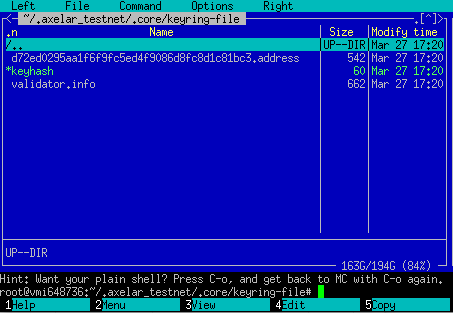 \
`` - ip of the server where the node is installed\
`` - the port that is used to connect. You can see which port is used for peers in the config.toml file:\

3\) **`private_peer_ids`** - a list of peers whose addresses are forbidden to be issued to the network, for public use. In other words, a node with this setting is not allowed to gossip about them on the network.
If `pex=true` then you must fill it out.\
If `pex=false` this parameter can be left blank as the gossip protocol is disabled.
It is written the same way as "persistent\_peers":\
`@:,@:,...`
4\) **`addr_book_strict`** first, let's look at the hint from config.toml
`addr_book_strict = true` - "strict" address book is enabled. Which means, to connect, your node will only consider the public network (public nodes). That is, there can be no connection to private networks.\
`addr_book_strict = false` - "strict" address book is disabled. In addition to public networks, the node has the opportunity to work in private / local networks. This is just what we need. Since we have to set up a private network for the validator. Sentry nodes must also have the `addr_book_strict = false` setting, since to set up private interaction, `false` must be on all members of the private network.
## Setting up Sentry nodes
Node setup steps: Install Axelar, change config.toml, configure firewall, restart node.
### Installing Axelar
После того, как мы арендовали новый сервер, нам надо так же, кAfter we rented a new server, we need to set up server security in the same way as for the validator node.
Then install the Axelar blockchain on it, and synchronize to the false state. There is no need to create a validator on this node. To do this, follow all the steps from the [Quick sync](/axelar-wiki/russian/ustanovka-axelar/full-setup-testnet.md#quick-sync) section, except Getting AXL tokens. \
And let's move on to changing config.toml.
### Editing config.toml
Enter the command below to open the config file in the nano editor:
```
nano ~/.axelar_testnet/.core/config/config.toml
```
Changes are made in the file's section "P2P Configuration Options":
```
###################################
### P2P Configuration Options ###
###################################
```
Change options for **Sentry Nodes**:
```
# Make the node visible on the network by enabling the gossip protocol
pex = true
# For Axelar, instead of we input 26656
# Insert the parameters of the Validator, as well as all your Sentry Nodes, separated by commas:
persistent_peers = "@:26656,@:26656"
# Sentry nodes should keep the validator secret from the network
private_peer_ids = "@:26656"
# Set false for private or local networks
addr_book_strict = false
```
{% hint style="info" %}
**pex = true** - Sentry nodes must be connected to a common blockchain network. To be able to use the shared address book, which means the gossip protocol must be enabled!
**persistent\_peers = "\@\:\,\@\:\"** - a list of Validator address and your Sentry Nodes addresses. You could add Sentry Node teams or trusted network members.
**private\_peer\_ids = "\@\:26656"** - Insert the validator's nodeid and ip to prevent Sentry nodes from propagating information about the validator.
**addr\_book\_strict = false** - this is the setting to allow Sentry nodes to operate on the private network. They will also be able to work in the public.
{% endhint %}
### Firewall setup
We have already configured the firewall in the "[opening the ports](/axelar-wiki/english/server-settings/opening-the-ports.md)" and "[change the ssh port](/axelar-wiki/english/security-setup/change-ssh-port.md)" sections. Therefore, nothing can be changed.
### Restart
Let's restart the node for the changes that we made in config.toml to take effect.
```
# Let's stop the node:
kill -9 $(pgrep -f "axelard start")
# Then resume the work of the Axelar node.
# Let me remind you that instead of my-secret-password you need to insert your keyring password:
KEYRING_PASSWORD='my-secret-password' ./scripts/node.sh -n testnet
```
Let's check the logs:
```
ulimit -n 16384
tail -f ~/.axelar_testnet/logs/axelard.log
```
If you have configured the "disk usage optimization", namely the log\_level = "warn" parameter, then it may be more convenient to see if the blocks are loaded by entering the command below several times:
```
ulimit -n 16384
curl localhost:26657/status | jq '.result.sync_info'
```
Now let's move on to setting up the validator.
## Setting up a validator node
Node configuration steps: Modify config.toml, configure firewall, restart node.
### Editing config.toml
We enter the command to open the config file in the nano editor:
```
nano ~/.axelar_testnet/.core/config/config.toml
```
Changes are made in the file's section "P2P Configuration Options":
```
###################################
### P2P Configuration Options ###
###################################
```
Change parameters **for the Validator**:
```
# Make the node private by disabling the gossip protocol
pex = false
# For Axelar, instead of we input 26656
# Insert the parameters of all your Sentry Nodes separated by commas:
persistent_peers = "@:26656,@:26656"
# Don't change anything, leave blank
private_peer_ids = ""
# Set false for private or local networks
addr_book_strict = false
```
{% hint style="info" %}
**pex = false** - The node will only connect to Sentry Nodes from the persistent\_peers list and will not propagate its address to the network. Thereby limiting the traffic.
**persistent\_peers = "\@\:\,\@\:\"** - a list of addresses of your Sentry Nodes, so that you can connect to them.
**private\_peer\_ids = ""** - We do not enter anything, since the gossip protocol is disabled, and the node will not issue any peers to the general network. Moreover, Sentry Node works not only in a private but also in a public network.
**addr\_book\_strict = false** - parameter allowing the validator to work in a private network.
{% endhint %}
### Firewall setup
We have already configured the firewall in the "[opening the ports](/axelar-wiki/english/server-settings/opening-the-ports.md)" and "[change the ssh port](/axelar-wiki/english/security-setup/change-ssh-port.md)" sections. Therefore, nothing can be changed.
The only thing is that now port 26656 is open to everyone. And you can close it and allow connection only to the IP of Sentry Nods. It is could be done like this:
```
sudo ufw deny 26656/udp
sudo ufw allow from to any port 26656/udp
sudo ufw allow from to any port 26656/udp
sudo ufw allow from to any port 26656/udp
sudo ufw status verbose
```
Where \, \,..., \ are the ip of servers with Sentry Node installed on them.
### Restart
Let's restart the node for the changes that we made in config.toml to take effect:
```
# Let's stop the node:
kill -9 $(pgrep -f "axelard start")
# Then resume the work of the Axelar node.
# Let me remind you that instead of my-secret-password you need to insert your keyring password:
cd ~/axelarate-community
KEYRING_PASSWORD='my-secret-password' ./scripts/node.sh -n testnet
```
Let's check the logs:
```
ulimit -n 16384
tail -f ~/.axelar_testnet/logs/axelard.log
```
If you have configured the "disk usage optimization", namely the log\_level = "warn" parameter, then it may be more convenient to see if the blocks are loaded by entering the command below several times:
```
ulimit -n 16384
curl localhost:26657/status | jq '.result.sync_info'
```
Now everything is ready! 🎉 Your Validator is protected from DDoS attacks.
Links:\
\
\
\
`` - ip of the server where the node is installed\
`` - the port that is used to connect. You can see which port is used for peers in the config.toml file:\

3\) **`private_peer_ids`** - a list of peers whose addresses are forbidden to be issued to the network, for public use. In other words, a node with this setting is not allowed to gossip about them on the network.
If `pex=true` then you must fill it out.\
If `pex=false` this parameter can be left blank as the gossip protocol is disabled.
It is written the same way as "persistent\_peers":\
`@:,@:,...`
4\) **`addr_book_strict`** first, let's look at the hint from config.toml
`addr_book_strict = true` - "strict" address book is enabled. Which means, to connect, your node will only consider the public network (public nodes). That is, there can be no connection to private networks.\
`addr_book_strict = false` - "strict" address book is disabled. In addition to public networks, the node has the opportunity to work in private / local networks. This is just what we need. Since we have to set up a private network for the validator. Sentry nodes must also have the `addr_book_strict = false` setting, since to set up private interaction, `false` must be on all members of the private network.
## Setting up Sentry nodes
Node setup steps: Install Axelar, change config.toml, configure firewall, restart node.
### Installing Axelar
После того, как мы арендовали новый сервер, нам надо так же, кAfter we rented a new server, we need to set up server security in the same way as for the validator node.
Then install the Axelar blockchain on it, and synchronize to the false state. There is no need to create a validator on this node. To do this, follow all the steps from the [Quick sync](/axelar-wiki/russian/ustanovka-axelar/full-setup-testnet.md#quick-sync) section, except Getting AXL tokens. \
And let's move on to changing config.toml.
### Editing config.toml
Enter the command below to open the config file in the nano editor:
```
nano ~/.axelar_testnet/.core/config/config.toml
```
Changes are made in the file's section "P2P Configuration Options":
```
###################################
### P2P Configuration Options ###
###################################
```
Change options for **Sentry Nodes**:
```
# Make the node visible on the network by enabling the gossip protocol
pex = true
# For Axelar, instead of we input 26656
# Insert the parameters of the Validator, as well as all your Sentry Nodes, separated by commas:
persistent_peers = "@:26656,@:26656"
# Sentry nodes should keep the validator secret from the network
private_peer_ids = "@:26656"
# Set false for private or local networks
addr_book_strict = false
```
{% hint style="info" %}
**pex = true** - Sentry nodes must be connected to a common blockchain network. To be able to use the shared address book, which means the gossip protocol must be enabled!
**persistent\_peers = "\@\:\,\@\:\"** - a list of Validator address and your Sentry Nodes addresses. You could add Sentry Node teams or trusted network members.
**private\_peer\_ids = "\@\:26656"** - Insert the validator's nodeid and ip to prevent Sentry nodes from propagating information about the validator.
**addr\_book\_strict = false** - this is the setting to allow Sentry nodes to operate on the private network. They will also be able to work in the public.
{% endhint %}
### Firewall setup
We have already configured the firewall in the "[opening the ports](/axelar-wiki/english/server-settings/opening-the-ports.md)" and "[change the ssh port](/axelar-wiki/english/security-setup/change-ssh-port.md)" sections. Therefore, nothing can be changed.
### Restart
Let's restart the node for the changes that we made in config.toml to take effect.
```
# Let's stop the node:
kill -9 $(pgrep -f "axelard start")
# Then resume the work of the Axelar node.
# Let me remind you that instead of my-secret-password you need to insert your keyring password:
KEYRING_PASSWORD='my-secret-password' ./scripts/node.sh -n testnet
```
Let's check the logs:
```
ulimit -n 16384
tail -f ~/.axelar_testnet/logs/axelard.log
```
If you have configured the "disk usage optimization", namely the log\_level = "warn" parameter, then it may be more convenient to see if the blocks are loaded by entering the command below several times:
```
ulimit -n 16384
curl localhost:26657/status | jq '.result.sync_info'
```
Now let's move on to setting up the validator.
## Setting up a validator node
Node configuration steps: Modify config.toml, configure firewall, restart node.
### Editing config.toml
We enter the command to open the config file in the nano editor:
```
nano ~/.axelar_testnet/.core/config/config.toml
```
Changes are made in the file's section "P2P Configuration Options":
```
###################################
### P2P Configuration Options ###
###################################
```
Change parameters **for the Validator**:
```
# Make the node private by disabling the gossip protocol
pex = false
# For Axelar, instead of we input 26656
# Insert the parameters of all your Sentry Nodes separated by commas:
persistent_peers = "@:26656,@:26656"
# Don't change anything, leave blank
private_peer_ids = ""
# Set false for private or local networks
addr_book_strict = false
```
{% hint style="info" %}
**pex = false** - The node will only connect to Sentry Nodes from the persistent\_peers list and will not propagate its address to the network. Thereby limiting the traffic.
**persistent\_peers = "\@\:\,\@\:\"** - a list of addresses of your Sentry Nodes, so that you can connect to them.
**private\_peer\_ids = ""** - We do not enter anything, since the gossip protocol is disabled, and the node will not issue any peers to the general network. Moreover, Sentry Node works not only in a private but also in a public network.
**addr\_book\_strict = false** - parameter allowing the validator to work in a private network.
{% endhint %}
### Firewall setup
We have already configured the firewall in the "[opening the ports](/axelar-wiki/english/server-settings/opening-the-ports.md)" and "[change the ssh port](/axelar-wiki/english/security-setup/change-ssh-port.md)" sections. Therefore, nothing can be changed.
The only thing is that now port 26656 is open to everyone. And you can close it and allow connection only to the IP of Sentry Nods. It is could be done like this:
```
sudo ufw deny 26656/udp
sudo ufw allow from to any port 26656/udp
sudo ufw allow from to any port 26656/udp
sudo ufw allow from to any port 26656/udp
sudo ufw status verbose
```
Where \, \,..., \ are the ip of servers with Sentry Node installed on them.
### Restart
Let's restart the node for the changes that we made in config.toml to take effect:
```
# Let's stop the node:
kill -9 $(pgrep -f "axelard start")
# Then resume the work of the Axelar node.
# Let me remind you that instead of my-secret-password you need to insert your keyring password:
cd ~/axelarate-community
KEYRING_PASSWORD='my-secret-password' ./scripts/node.sh -n testnet
```
Let's check the logs:
```
ulimit -n 16384
tail -f ~/.axelar_testnet/logs/axelard.log
```
If you have configured the "disk usage optimization", namely the log\_level = "warn" parameter, then it may be more convenient to see if the blocks are loaded by entering the command below several times:
```
ulimit -n 16384
curl localhost:26657/status | jq '.result.sync_info'
```
Now everything is ready! 🎉 Your Validator is protected from DDoS attacks.
Links:\
\
\